FM27 Comeback Skin
FM24's sidebar is back, and now FM24's Home, player profile, top bar and Club Profile too, with stadium and city photos, a trophy cabinet and FM24's gold stars. In black and gold, with nothing from FM27 taken away.
- Installs in a minute
- No copying files by hand
- Undo any time

What it changes
Your next match across the top, then your fixtures, the league table, your club's Player Stats and Team Stats, the match preview, finances, budgets and your current deals with each club's crest and the fee. The inbox stays on Messages.
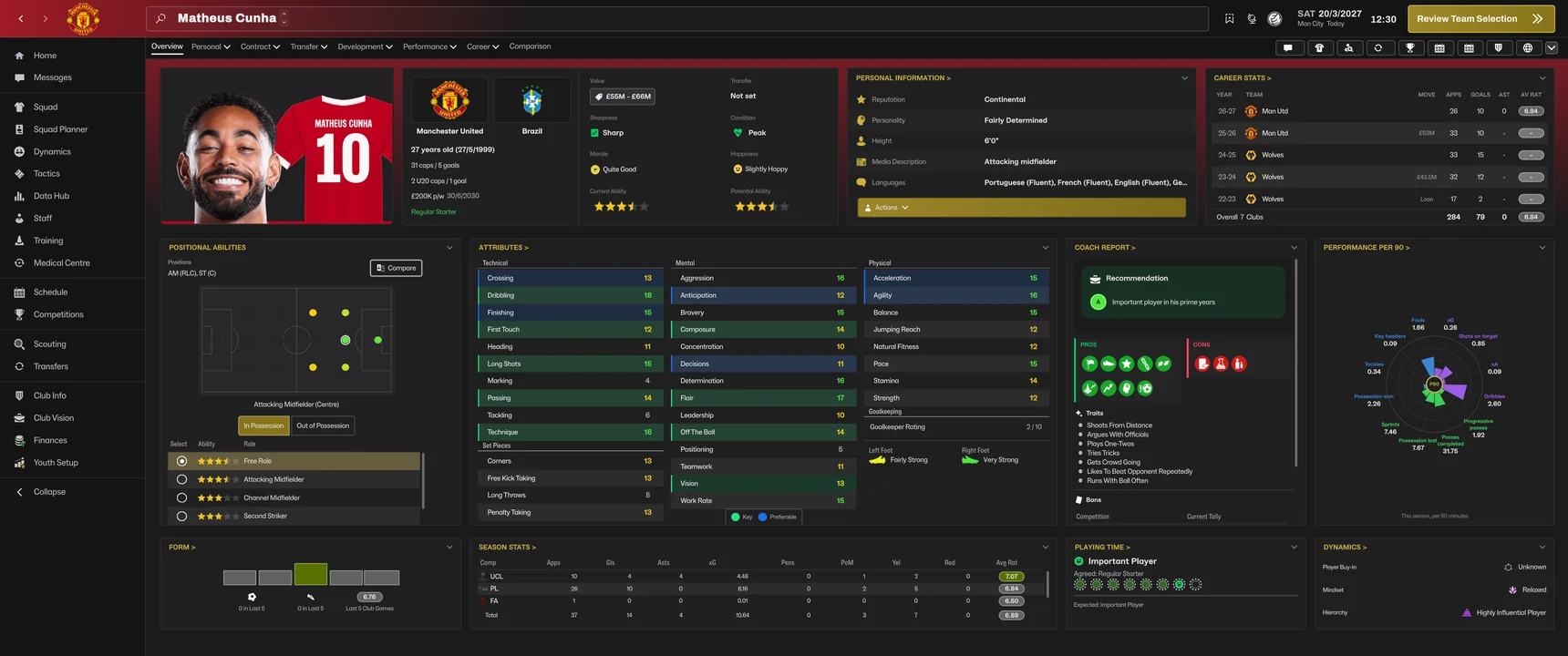
A player card with his face and shirt, the crest and flag, value, status and ability stars in the top row, then Personal Information, Career Stats, Attributes, Coach Report, Form, Season Stats and more, laid out like FM24.
Back and forward arrows and your crest on a glow in your club's colour, one long search box with the screen's name, and your next match and how many days away it is under the date.
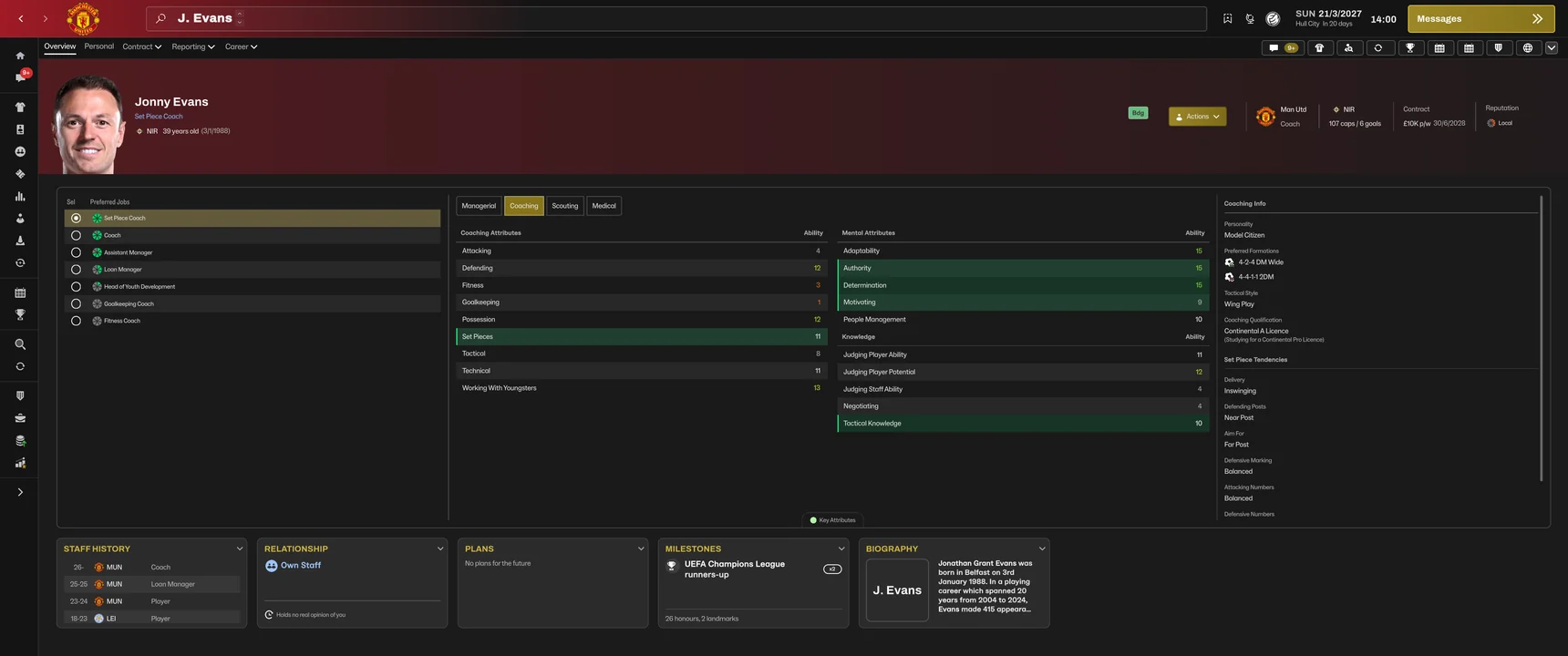
1 to 20 again, as in FM26, on staff profiles, My Profile, the staff tables and Staff Search, not FM27's words.
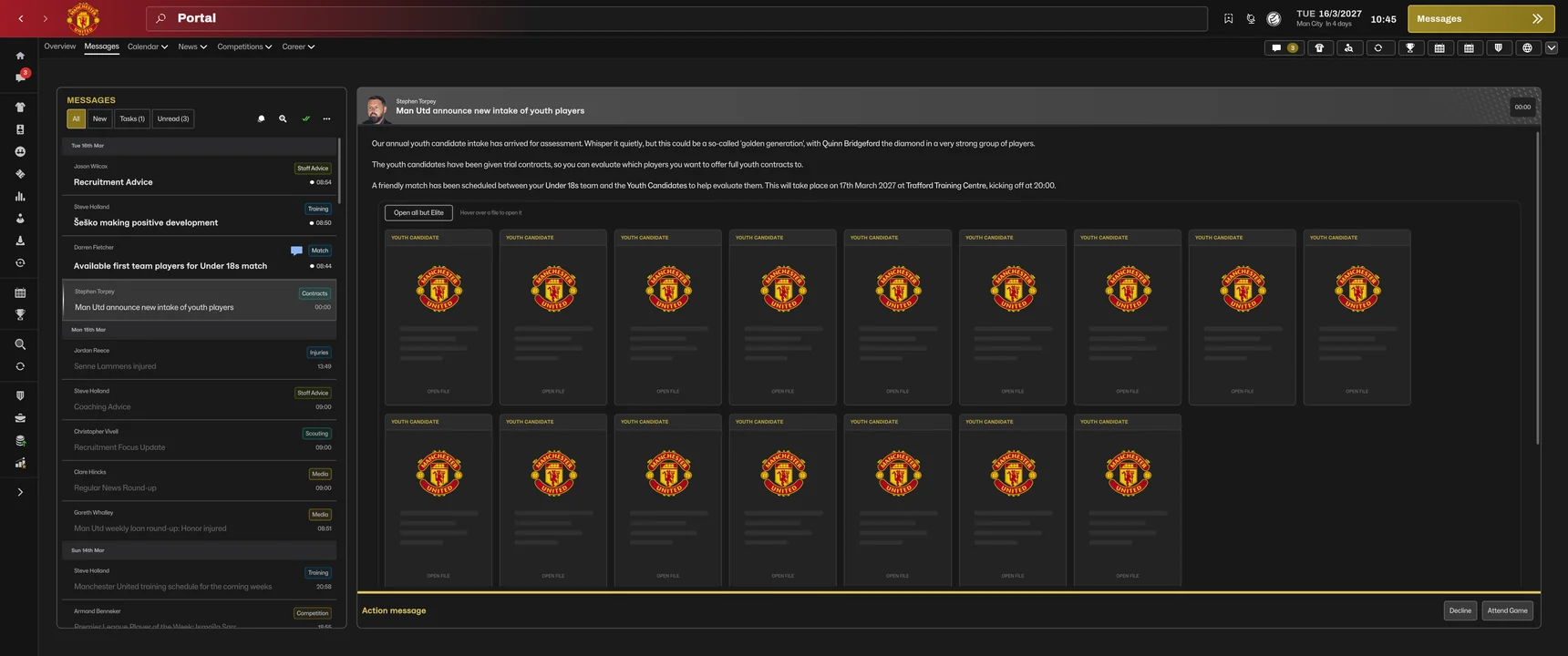
Intake day shows the youth candidates as closed files in a shuffled order. Hover over a file to open it, or open all but the Elite prospects.
Inj, Wnt, Lst, Unh and the rest in the squad tables, with FM24's own pictures and colours.
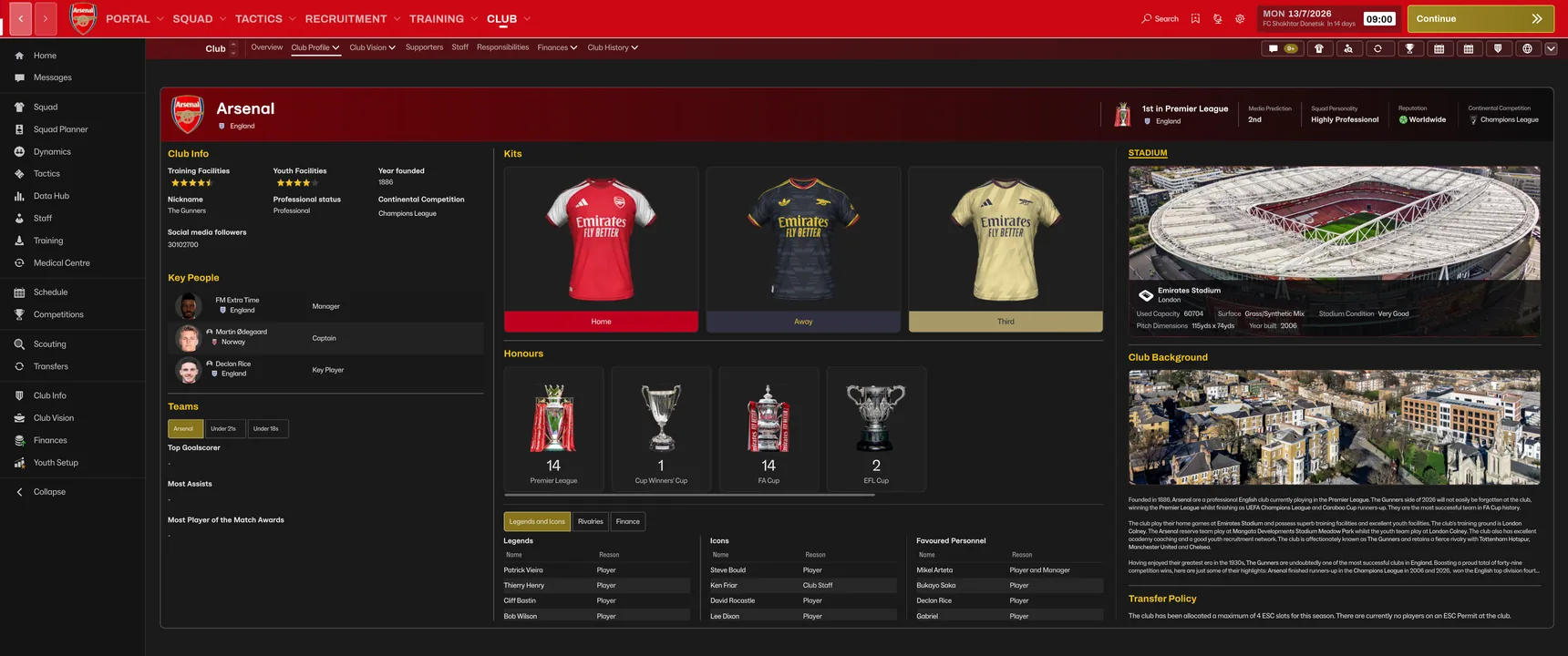
Club info and facility stars, key people, kits and honours, plus a stadium photo and a city photo for every club. FM27 has no stadium pictures at all: the skin brings them back from any stadium or city pack you have.
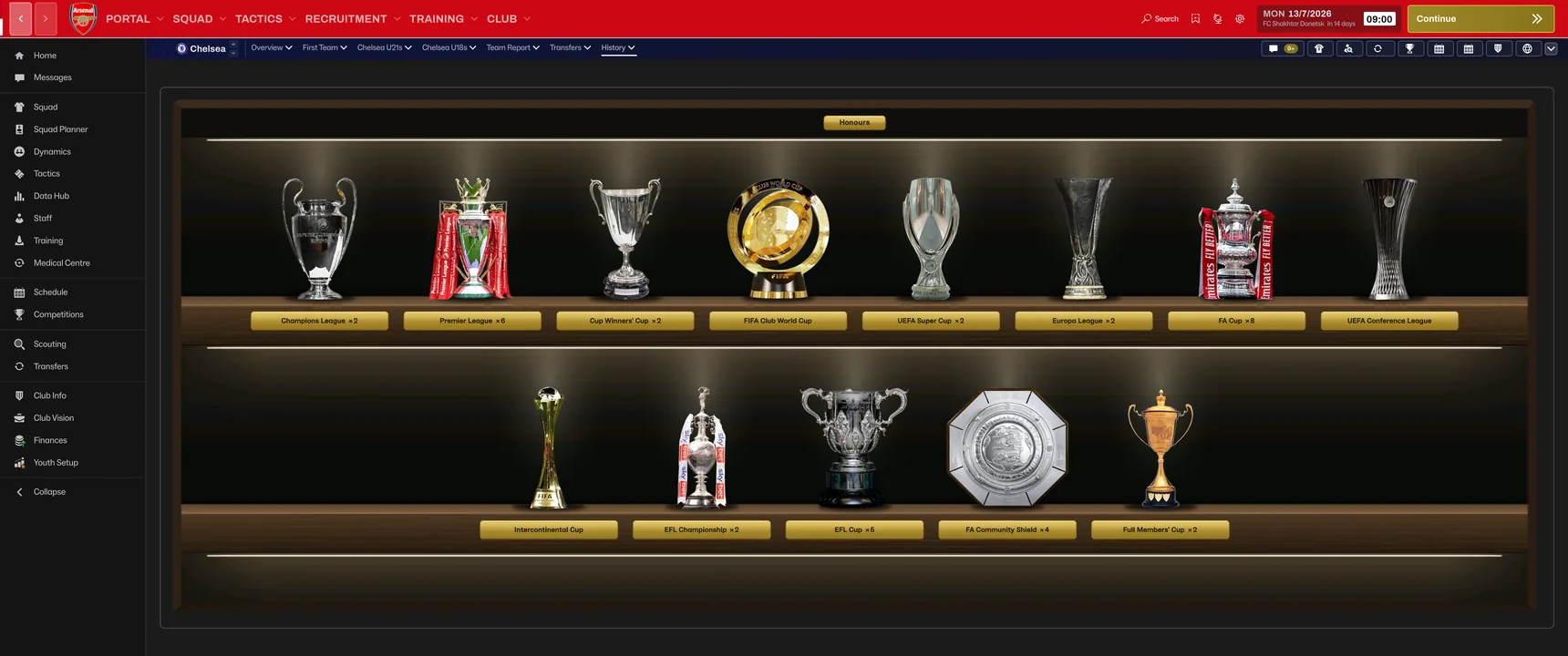
Club History, Honours shows every trophy a club or nation has won on lit shelves, each with a brass plaque and the number of wins, biggest competitions first.
Star ratings are FM24's gold stars again, wherever FM shows them: ability and potential, staff and facilities.
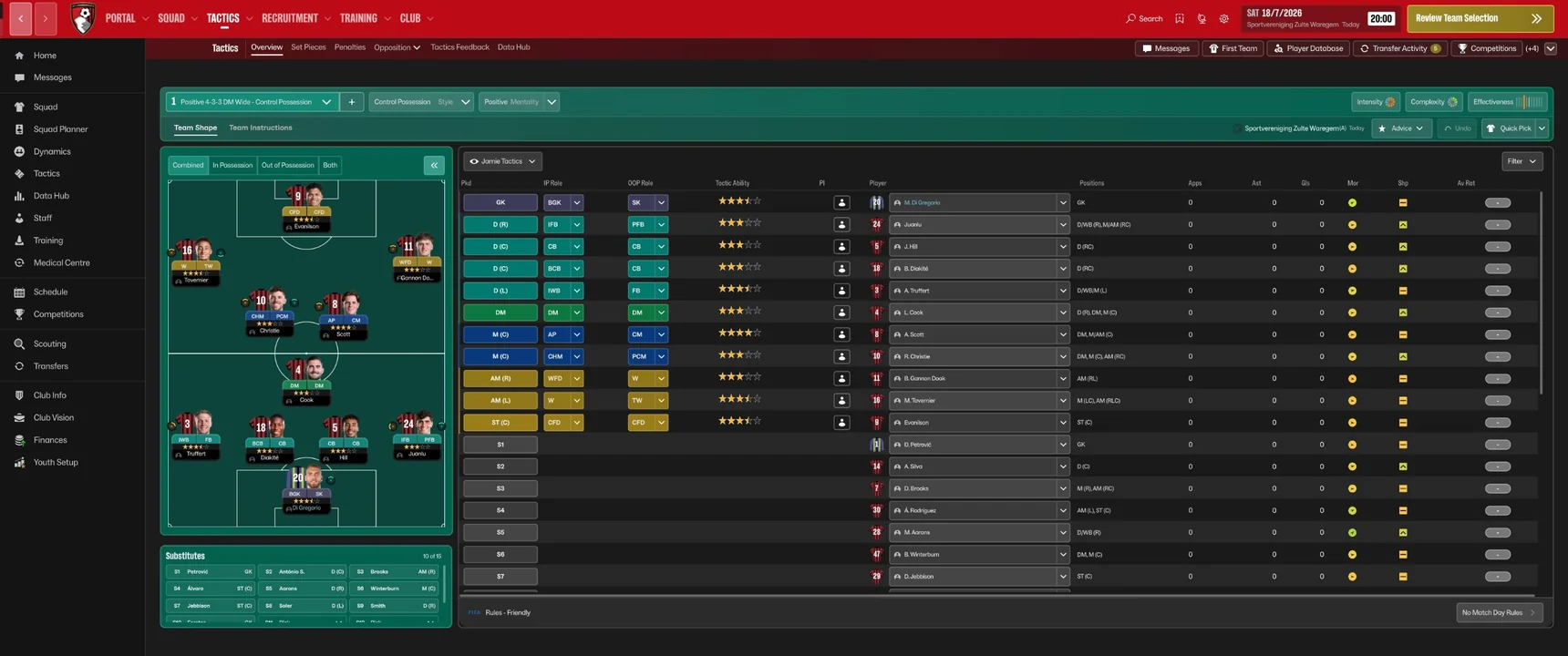
Eighteen one-click links run down the left again, like FM24's sidebar, from Squad to Finances, with a red count on Messages when you have unread mail.
Click Collapse at the bottom of the sidebar and it shrinks to just the icons, with every page widening into the space. One click brings the names back.
Club, Staff, Overview shows all three departments side by side again: roles and board feedback, the staff lists, and how each compares with the rest of the league.
Recruitment, Scouting, World Knowledge opens a full page with your scouting knowledge next to a world map, like FM24's. Every scout's profile shows the map too.
Bold headings, and link headings such as NEWS and LEAGUE TABLE in capitals, as in FM24. Body text stays in FM's font, so Text Scaling in Preferences works.
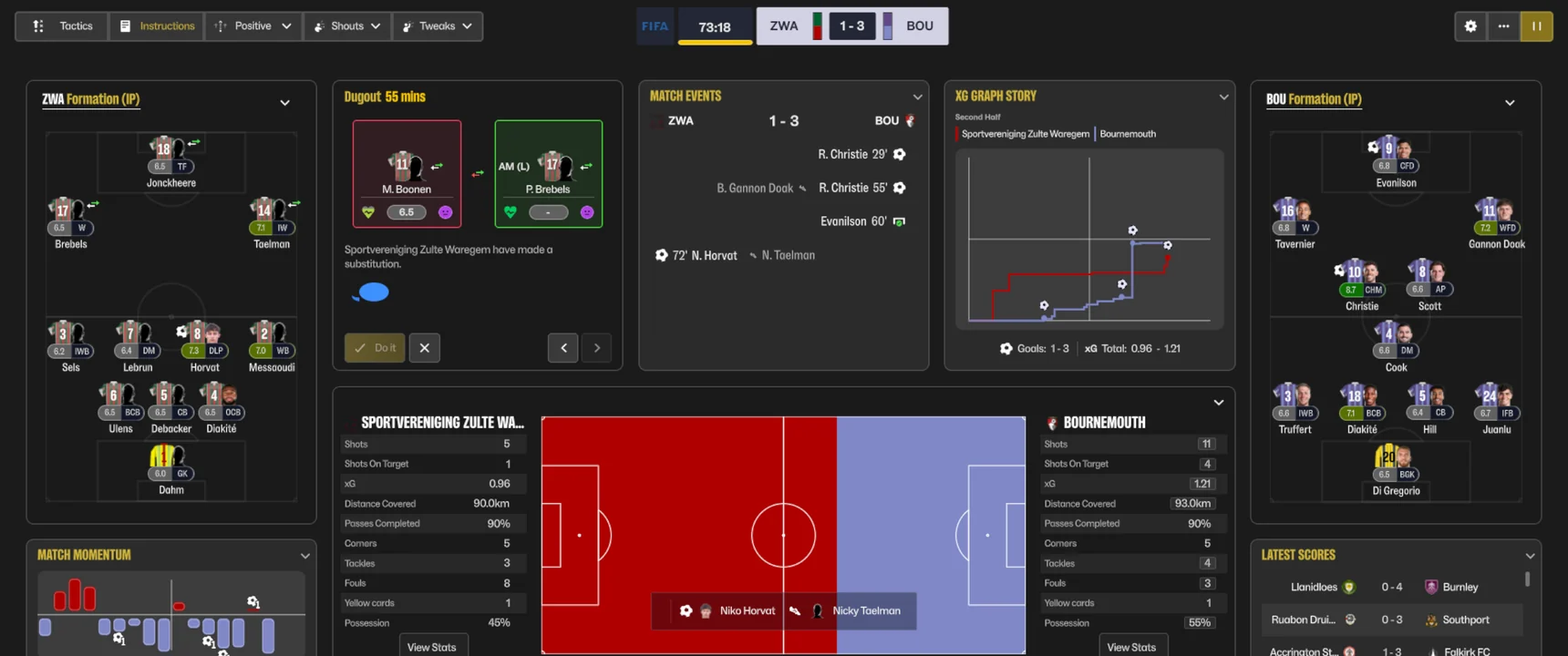
Each player's face sits next to his shirt on the Tactics screen, in-match Tactics, the match formation boxes, the squad strip, the dugout and the team talk. Works with your facepack.
A dark sidebar, charcoal panels, gold titles and a gold Continue button, a glow in your club's colours behind the crest in the top bar, and no competition wallpaper behind every screen.
No hunting for FM's game folder or copying files by hand. Install.bat finds FM27, backs up its files and puts the skin in, and Restore.bat undoes it. On Mac, Install.command and Restore.command do the same.
New in 1.7.1: Messages in the sidebar now shows your message beside the list (FM's own pick: the newest unread, else the one you last read). Version 1.7 brought FM24's Home, with your next match, fixtures, the league table, your club's Player Stats and Team Stats, the match preview, finances and your current deals. FM24's player profile and top bar, with your next match under the date. A red unread count on Messages in the sidebar. Staff attributes as numbers again, FM24's status flags in the squad tables, and youth intake day as scouting files. The stadium photo on the Club Profile is no longer covered by its details, the sidebar works when you are out of a job, and the pre-match screens use the whole screen. Version 1.6.3 kept the trophies in the trophy cabinet, with FM's competition logos everywhere else. Version 1.6 brought FM24's Club Profile with a stadium photo and a city photo for every club, a trophy cabinet in Club History, Honours, and FM24's gold star ratings. The photos and trophies come from free graphics packs (see below), and Install.bat sets them up for you. Version 1.5 brought FM24's Staff screen, a World Knowledge page with a world map, and working Text Scaling. Version 1.4 added the Collapse button and FM24-style headings, and 1.3 added player faces, FM24 style, next to the shirts on the Tactics screen and on the match screens.
The sidebar
Every page of FM27's own Portal, Squad, Tactics, Recruitment, Training and Club menus is in the tabs under the top bar.
More screens
How to install
On Windows
- Download and extractRight-click the zip and choose Extract All. Do not run anything from inside the zip.
- Close FM27, run Install.batIt finds FM27, backs up the original files, puts the skin in and sets up the club photos. If Windows warns you, click More info, then Run anyway.
- Start FM27The sidebar is there. To go back, run Restore.bat. Doing it by hand instead? The READ ME in the zip shows how.
On Mac (FM27 on Steam, Apple Silicon or Intel)
- Download and unzipDouble-click the zip, then open the folder it makes.
- Quit FM27, run Install.commandOpen Terminal, type bash and a space, drag Install.command into the window and press Enter. It finds FM27, backs up the original files, puts the skin in and sets up the club photos.
- Start FM27The sidebar is there. To go back, run Restore.command the same way. If macOS blocks Terminal, see the questions below.
This version is for FM27 after its 2 November 2026 update. FM27's full release on 10 November 2026 will need the updated skin, which will be here.
Stadium photos and trophies
The skin works without them, but the Club Profile and the trophy cabinet look their best with these free packs from sortitoutsi. Any other stadium or city photo pack works too.
- Download the packsThe Trophies Pack, and the Stadium Backgrounds and Team City Backgrounds packs from this page. Their pages say FM24 and FM26: they work with the skin in FM27.
- Put them in your graphics folderExtract each one into Documents\Sports Interactive\Football Manager 27\graphics (on Mac, ~/Library/Application Support/Sports Interactive/Football Manager 27/graphics). Make the graphics folder if it is not there.
- Run Install.bat againWith FM closed (Install.command on Mac). At the end it finds the packs, sets up the photos for every club and puts the trophies in the trophy cabinet, then lists what it found.
Questions
Is the Comeback skin free?
Yes. No account and nothing to pay. If you like it, you can buy us a coffee, but you never have to.
Does it change my saves?
No. It only swaps nine of FM27's interface files for our versions. Your saves, your database and the game itself are not touched.
Do I have to copy files into FM's game folder?
No. Double-click Install.bat and it finds FM27 for you (Steam, Epic or Xbox, on any drive), checks your game version, backs up FM's own files and puts the skin in. On Mac, Install.command does the same. If you would rather do it by hand, the READ ME in the zip shows how.
I have an older version. How do I update?
Download this version and run its Install.bat. It updates the skin in place from version 1.4 or later, test builds included. Still on 1.0 to 1.3.1? Verify the game files in Steam first, then run Install.bat. To go back to FM's normal look later, verify the game files in Steam, or use Restore.bat from the folder you first installed from.
How do I get the stadium photos and trophies?
Download the free Trophies Pack, Stadium Backgrounds Pack and Team City Backgrounds Pack from sortitoutsi (links above), extract them into your FM27 graphics folder, close FM and run Install.bat again (Install.command on Mac). It finds the packs, sets up a photo for every club it can and puts the trophies in the trophy cabinet. Any other stadium or city photo pack works too.
Why does the stadium box show seats in my club's colours?
That club has no photo in your packs, or you have no stadium pack yet, so the skin draws stands and a crowd in the club's colours instead. Add a stadium or city pack and run Install.bat again to get the photos.
Why does the trophy cabinet show logos, not trophies?
The cabinet shows a competition's logo when it has no trophy for it. The trophies show once the club pictures setup has moved them into the cabinet's own slot: put the Trophies Pack in your graphics folder, close FM and run Install.bat again (or Set up club pictures.bat). If you had an older trophy pack before, delete your old trophies folder and extract the pack again, so there is only one copy: FM27 skips any picture whose file name is in the graphics folder twice.
Do the trophies replace the competition logos?
Not since 1.6.3. FM27 has only one picture per competition, so before that the Trophies Pack showed trophies wherever FM shows a competition's logo. Now the club pictures setup moves the trophies into a slot that only the trophy cabinet and the Club Profile use, so the logos stay logos everywhere else. Updated or unzipped the trophy pack again? Run Install.bat or Set up club pictures.bat again. Restore.bat puts the trophy pack back as it was.
The setup says it found no stadium or city packs. What now?
It says which graphics folder it read. If your packs are somewhere else (for example you moved FM27's folder to another drive), paste that graphics folder when it asks, and it remembers it. Unzip each pack into the graphics folder as it comes, without moving its files around, and keep packs out of the two FM Extra Time folders: those are the setup's own. If it says Windows would not let it write, switch off Controlled folder access in Windows Security, run Set up club pictures.bat again, then switch it back on.
What are the FM Extra Time stadiums and cities folders?
Install.bat makes them in your graphics folder for the Club Profile photos. The photos in them are links to your packs' own files, so they take no extra space. Leave them there while you use the skin. Without the skin they do nothing, so you can delete them.
Can I hide the names and just keep the icons?
Yes. Click Collapse at the bottom of the sidebar and it shrinks to just the icons, with every page widening into the space. Click the arrow at the bottom to bring the names back. The sidebar starts with names each time you launch FM.
How do I go back to the normal look?
Run Restore.bat from the download (Restore.command on Mac), which puts FM's original files back and your trophy pack as it was. Or in Steam, right-click Football Manager 27, Properties, Installed Files, Verify integrity of game files.
What happens when FM27 updates?
Steam replaces some of FM's files with the new ones, which switches the skin off, or leaves it half on if only some files change. If anything looks odd, verify the game files in Steam (not Restore.bat, whose backup is from before the update), then come back here for the updated skin. Install.bat checks your game version first and changes nothing if it does not match.
Does it work on Mac?
Yes. Download the Mac version, made for FM27 on Steam (Apple Silicon or Intel Macs). Unzip it, quit FM27, open Terminal, type bash and a space, drag Install.command into the window and press Enter. If macOS says Terminal is not allowed to change FM's files, open System Settings, Privacy and Security, App Management, switch on Terminal and run it again. If FM27 has updated since you installed the skin, verify the game files in Steam and start FM27 once before running Install.command. If macOS ever says fm is damaged, click Cancel (not Move to Bin) and do the same.
Pages look see-through, or FM's purple is back?
FM's 2 November update put one of its own files back over the skin's, which happens when the skin went on before Steam had updated FM. Quit FM27 and run Install.bat (Mac: Install.command) from the newest download again. Since 1.5.1 the installer waits for the update, so it cannot happen again.
Does it work on Epic, Xbox or Steam Deck?
It is made and tested on the Steam version. Epic should work the same way. The Xbox app / PC Game Pass version has its own versions of two files, and Install.bat spots that and uses the right ones. Players are using it on the Steam Deck too.
Data Hub looks frozen. Is that the skin?
No. The first time you open Data Hub, FM shows a tutorial popup, and on some PCs it never appears, which blocks every click. It happens without the skin too. Reset tutorials in FM's preferences, then open Data Hub and click Understood.
Why is my club's name still orange in league tables?
FM sets that colour in its own code, not in the files a skin can change, so it stays orange. Everything else follows the black and gold look.
Something looks wrong
Tell us in the Discord with a screenshot and your screen size, and we will look at it for the next version.
Get FM24's sidebar back
Free for FM27 on Windows and Mac, now with FM24's Home, player profile, top bar and Club Profile. 20.2 MB, ready in a minute.
Like the skin? Everything we make is free. A coffee helps us keep it updated for every FM27 patch.
Buy us a coffee